Every CI-V menu.Your whole station.In command on Mac.
Built from the FX Radio Utility operating engine and engineered specifically around strict binary Icom CI-V framing. Control 308 to 499 model-scoped transceiver settings with verified readback, stream 48 kHz LAN/WLAN audio directly from built-in Icom network servers, and run FT8/FT4, DX intelligence, UTC synchronization, and an ADIF logbook in one native workspace.
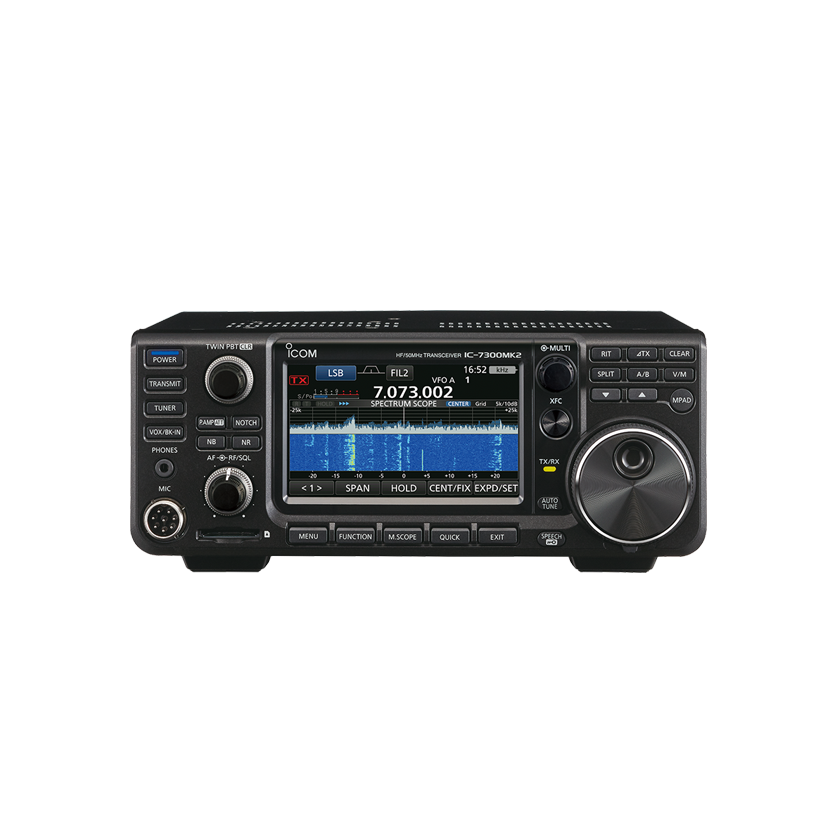
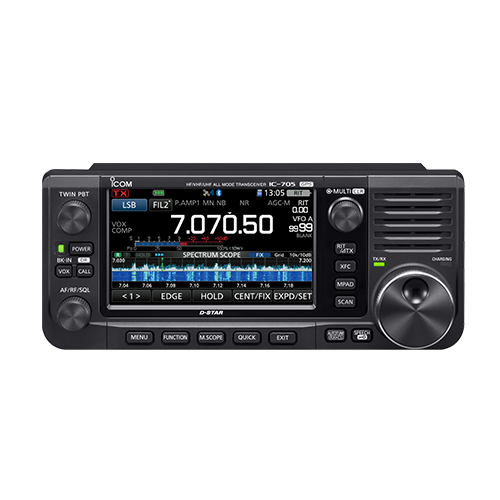
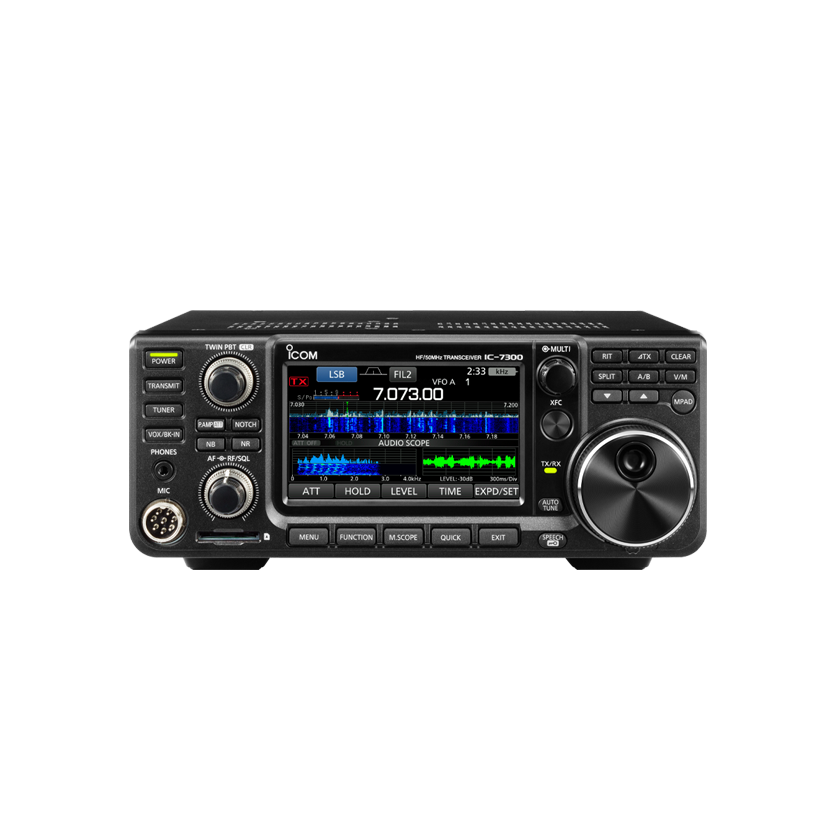
IC-705A4h · USB / WLAN UDP · 499 controlsIC-730094h · USB / TCP Bridge · 308 controlsIC-7300MK2B6h · USB / LAN UDP · 365 controls
Three Icom architectures. Explicit model boundaries.
Each supported transceiver has its own default CI-V address, frequency coverage, network server capability, and DATA MOD command map. Browsing or connecting never sends cross-model fallback writes.
PORTABLE HF / VHF / UHF ALL MODE
IC-705
CI-V A4h
FRONT PANEL
Compact all-mode field transceiver with built-in WLAN UDP server, D-STAR (DV), GPS/D-PRS, and 100 memory groups.
The classic direct-sampling HF/50 MHz transceiver. Operates over local USB CI-V + USB Audio, or via an external raw TCP serial bridge with separately routed audio.
Raw CI-V TCP (civ-tcp://) + dedicated CoreAudio RX/TX devices
1A 05 01 19 01 (USB) 1A 05 01 19 03 (WLAN)
IC-7300
94h (custom 01h–DFh)
USB CI-V (9600–115200) + CoreAudio USB CODEC; RTS/DTR cleared
No internal LAN server (blocked in UI & transport policy)
Raw CI-V TCP (e.g., ser2net) + separate remote audio routing
1A 05 00 67 03 (USB)
IC-7300MK2
B6h (custom e.g. 94h)
USB CI-V (9600–115200) + CoreAudio USB CODEC; RTS/DTR cleared
Built-in Ethernet LAN · Icom UDP control (50001), CI-V & 48 kHz PCM
Raw CI-V TCP (civ-tcp://) + dedicated CoreAudio RX/TX devices
1A 05 00 85 01 (USB) 1A 05 00 85 05 (LAN)
02 / MODEL-SCOPED CI-V CATALOG
1,172 documented CI-V controls. Inspect every frame before you send.
Browse the complete embedded civ-settings.json and operating command catalog used inside CAT Studio. Browsing never opens hardware or writes values; every setting belongs to an explicit radio model.
Loading model-scoped CI-V catalog…
IC-7300MK2 · VFO & mode
Selected VFO frequency
R/W
Receive frequency in Hz. Verified by independent readback.
BINARY CI-V WRITE / ACTION FRAME (CONTROLLER E0h → RADIO)
FE FE B6 E0 05 <data> FD
BINARY CI-V READBACK / QUERY FRAME
FE FE B6 E0 03 FD
Engineered for clean modulation and bounded UDP timing.
Versions 0.1.1 and 0.1.2 introduce an 80 ms primed network TX look-ahead buffer, 5 ms monotonic sample-clock refills, interactive TX Audio Drive calibration, and multi-radio slot coordination across the Radio Utility Family.
80 ms Primed Network TX Stream & Monotonic Refill (v0.1.1+)
Direct 48 kHz mono LPCM16 transmit streams prime 80 ms of waveform before playback and refill against a monotonic sample clock every 5 ms using 10 ms UDP datagrams. Short callback stalls catch up cleanly; if the local buffer budget is exhausted or a socket returns EAGAIN, the slot aborts immediately and releases CI-V PTT rather than sending a compressed late burst.
120 ms Receive Reorder Window & 95-Tap FIR Decimation
Incoming UDP audio packets are reordered in a bounded 120 ms jitter window with selective retransmission requests for short missing ranges. A streaming 95-tap FIR low-pass filter converts 48 kHz network PCM to the 12 kHz FT8/FT4 decoder input. Unrecovered audio gaps invalidate the partial slot—samples are never concatenated across an unacknowledged hole.
SDR-Control Style Radio Hardware Setup & Co-TX Sync (v0.1.2)
Inspect and adjust RF Power setpoint, LAN/USB Modulation level, DATA Filter (FIL1–FIL3), AGC, Preamp, Attenuator, Noise Blanker, and Noise Reduction directly from the FT8 workspace with CI-V readback. When running multiple family apps simultaneously, FamilyTXSyncCoordinator aligns even/odd slots or yields general CQ slots to active QSOs on peer radios.
USB-D MODULATION CALCULATOR
TX Audio Drive & dBFS Preview
76%
PEAK LEVEL-2.4 dBFS
RMS LEVEL-5.4 dBFS
ESTIMATED DRIVE100% Setpoint (Optimal ALC)
In Icom USB-D mode, RF output power scales with audio drive squared (P ∝ V²) until the transceiver’s ALC threshold is reached. 76% (-2.4 dBFS peak / -5.4 dBFS RMS) is the standard reference drive to reach full configured RF power with clean ALC. Per-slot network timing is logged to Digital-TX-network.jsonl.
04 / COMPLETE STATION ARCHITECTURE
18 native workspaces. One isolated macOS bundle.
com.factoreal.icomutility uses its own preferences prefix, Application Support folder, QSL Keychain service, and ADIF identity—preserving any existing FX Radio Utility installation untouched.
01 · CONNECTION
USB, LAN/WLAN & Bridge
Select radio model, confirm hex CI-V address, authenticate direct Icom UDP sessions in memory, or bind a raw TCP serial bridge and explicit TX audio output.
02 · RADIO SCREEN
Live CI-V Front Panel
Model-specific recreated front panels for IC-705, IC-7300 and IC-7300MK2, driven by CI-V frequency/mode/filter and meter replies. Unknown readings stay blank; the labelled audio waterfall shows the receive passband.
03 · CAT STUDIO
Settings, Snapshots & Console
Browse 308–499 model-scoped CI-V controls, run read-only query macros, store radio state snapshots, and inspect binary CI-V traffic and round-trip timing.
04 · AUDIO & FT8
FT8 / FT4 Digital Engine
Full FT8/FT4 encoder and decoder, waterfall spectrum, directed exchanges, Target Watch, SWR cutoff, amplifier power policy, and Radio Hardware Setup sheet.
05 · STATION
Profiles & Band Presets
Manage operator callsign, Maidenhead grid locator, station equipment metadata, and quick-tune frequency presets verified by CI-V readback.
06 · LOGBOOK & QSL
ADIF & Confirmation Sync
Local QSO database, explicit ADIF import/export, QSL card renderer, and opt-in QRZ, Club Log, eQSL, and LoTW workflows with Keychain credential isolation.
07 · DX COACH & CLUSTER
Spot Intelligence & Alerts
Live DX Cluster stream, novelty alerts, band-opening watches, and assisted DX opportunity ranking matched against your worked logbook history.
08 · WORLD MAP & BANDS
GridTracker Map & Propagation
Great-circle paths, Maidenhead grid overlays, live band condition badges, solar indices, and automated band-hopping schedules.
09 · TIME PRECISION & MORE
Marzullo NTP & Telemetry
Multi-server SNTP with Marzullo consensus, oscillator drift estimation, receive diagnostics, CW/Voice local preview tools, and official Icom manual links.
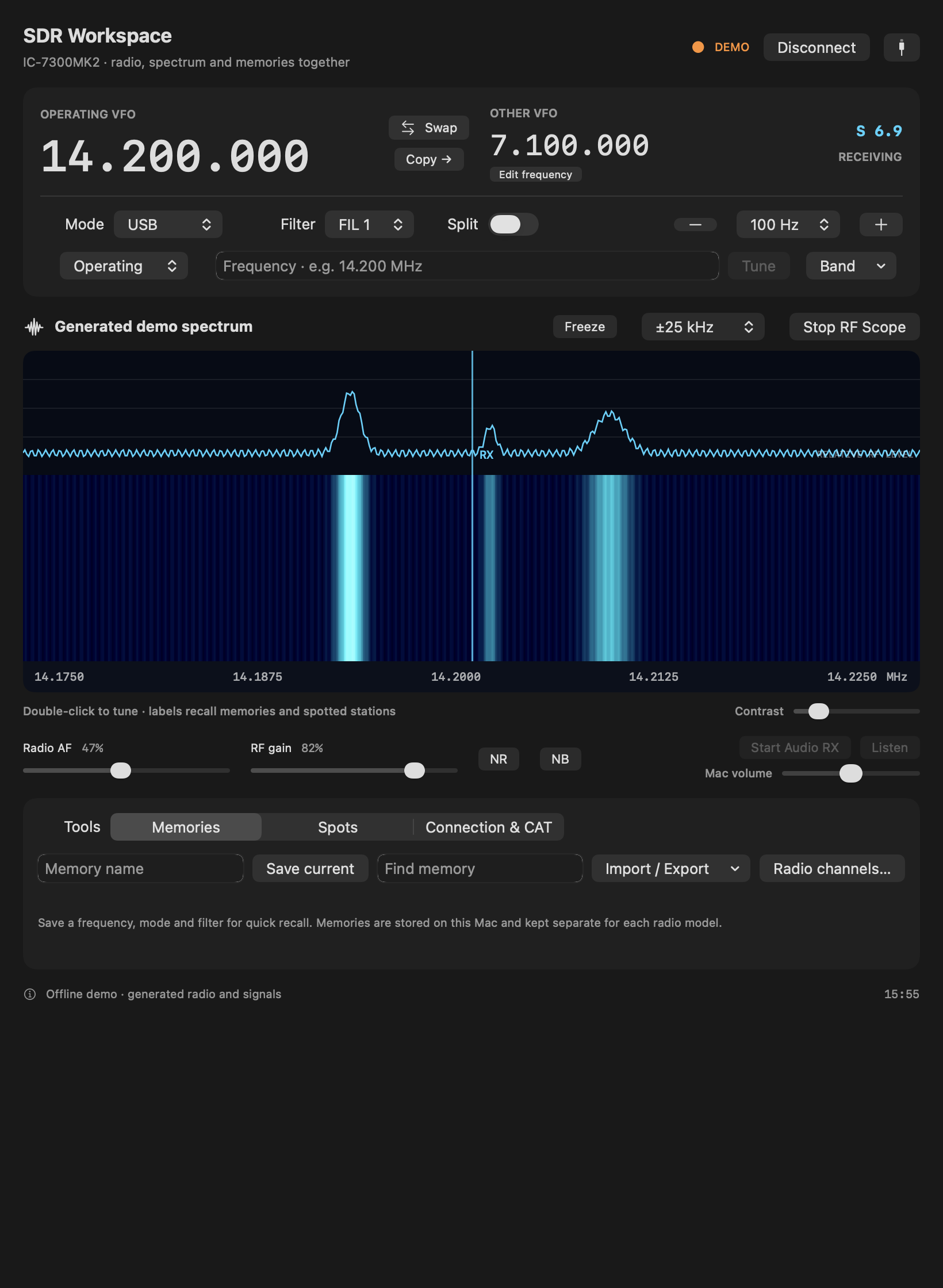
NEW IN 0.2.0 / SDR WORKSPACE
Your radio. One clear operating view.
Tune the operating or other VFO, watch complete CI-V RF sweeps, recall local memories and follow recent DX/FT8 labels. Advanced controls stay one click away.
Actual native UI · explicitly labelled offline demo · generated signals, no connected radio.
Real RF scope
Complete 475-point CI-V sweeps, click-to-tune, span, freeze and contrast. RF streaming starts only when you request it.
Memories & listening
Model-specific local memories with CSV preview/merge/export, recent spot labels, and optional receive monitoring with separate Mac volume.
Connect other tools
A local Hamlib server starts read-only on 127.0.0.1. External tuning and TX have separate explicit permissions. No general remote-control listener is exposed.
Offline protocol, lifecycle and layout checks passed. Physical RF scope, USB, speaker routing and RF TX validation remain pending. This release adds selected SDR workflows; additional decoders and hardware dual-watch are outside its scope.
NATIVE ICON COMPOSER ASSET · ASSETS.CAR + ICNS
Designed for modern macOS appearances.
The independent transceiver icon artwork depicts a silver digital transceiver, cyan waterfall, and signal arcs—compiled from assets/ICOM-Radio-Utility.icon via xcrun actool into Assets.car. Preview the actual rendered appearances below:
Default Light Appearance
05 / HARDWARE VALIDATION & EVIDENCE SCOPE
Verified on an IC-7300MK2. Transparent about every boundary.
Routine connection and hardware validation tests are strictly read-only—never keying PTT, retuning VFOs, changing modulation settings, or writing firmware.
What is tested vs. what requires operator verification
Automated Test Suite: Offline unit/integration tests pass across XCTest and Swift Testing, covering BCD encoding, fragmented CI-V frames, echo rejection, packet reordering, 35–45 ms stall injection, and loopback TCP keying.
Physical Models & USB: Live hardware testing was performed over LAN UDP on an IC-7300MK2. Physical USB serial/audio connections and physical IC-705 and original IC-7300 units require their own hardware validation.
Supervised RF Transmission: Keying, USB-D preparation, SWR protection, and network TX buffering are verified against loopback sockets/simulated radios; on-air RF waveform continuity and ALC drive must be supervised on physical hardware.
CW, Voice & Firmware Scope: CW receive/practice and voice clip previews are local; CAT Studio separately offers explicit on-radio CW and stored-voice-memory actions, verified only with simulated radios. The Firmware workspace provides official Icom manual links—no firmware writer is included.
macOS Runtime Target: Built with Xcode 27.2 SDK and tested on macOS 26.7.2 (Apple Silicon). Generation-27 icon assets compile with actool; a macOS 27 host runtime has not been tested.
06 / DOWNLOAD & GET ON THE AIR
Download ICOM Radio Utility for macOS.
Requires macOS 14.0 or newer on Apple Silicon (arm64). Signed for local development (not Apple-notarized; confirm first launch in macOS System Settings → Privacy & Security).
Complete band menus from 160m through 6m, plus 4m (70 MHz) for IC-7300 and IC-7300MK2. Includes missing 160m/60m presets, model-specific band plans, selectable hopping targets and 4m logbook/ADIF support. 60m/4m transmission depends on the regional radio version; IC-705 has no 4m transmit support. The 7300 family receives up to 74.8 MHz; this is not continuous transmit coverage. Verified offline with simulated radios; physical USB and RF transmission validation remains pending.
Open Connection, pick IC-705 (A4h), IC-7300 (94h), or IC-7300MK2 (B6h), and confirm the radio’s hexadecimal CI-V address. For USB, match the radio’s baud rate (9600–115200) and disable hardware RTS/DTR keying.
STEP 02 · NETWORK OR BRIDGE
Connect Control & Audio
For IC-705 WLAN or IC-7300MK2 LAN, enter the radio IP, port 50001, and network credentials (held only in session memory). For a remote original IC-7300, connect a raw TCP serial bridge (e.g. ser2net) and route dedicated CoreAudio devices.
STEP 03 · VERIFY & OPERATE
Readback Before TX
Enter your callsign and Maidenhead grid in Station, choose the explicit Transmit audio destination, open Audio & FT8, press Start RX, and verify frequency readback with Tune before starting digital operation.